Bosch Induction Cooktop How To Unlock: Easy Fixes

A Bosch Induction Cooktop usually unlocks by holding the Control Lock key for about 4 seconds.
If your Bosch Induction Cooktop is stuck and won’t respond, you are not alone. I’ve seen this happen after cleaning, after a power cut, and even when someone brushes the touch panel by accident. The good news is that Bosch cooktop lock issues are usually simple once you know the right steps, and this guide walks you through Bosch Induction Cooktop How to Unlock in a clear, practical way.
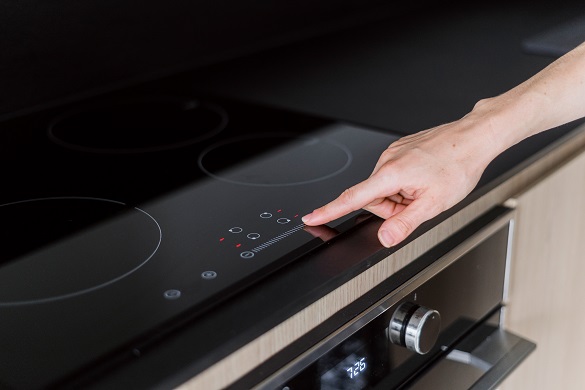
Why your Bosch induction cooktop is locked
A locked Bosch induction cooktop is usually a safety feature, not a failure. Bosch uses a control lock to stop accidental touches, which is helpful when kids are nearby or when the surface is wet. In my experience, this is one of those features people only notice when they need to cook fast.
The lock can turn on for a few common reasons:
• Someone pressed the lock key by mistake while wiping the panel
• The cooktop entered a safety mode after a power interruption
• Moisture, food residue, or cookware placement caused the touch controls to misread input
• The child lock was enabled on purpose and later forgotten
Most of the time, Bosch Induction Cooktop How to Unlock is a fast fix. Still, it helps to understand why it locked in the first place so the same problem does not keep coming back.

How Bosch induction cooktop locking works
Bosch induction cooktops use touch controls. That means the surface reads your finger taps instead of mechanical buttons. When the control lock is active, the panel ignores normal cooking commands.
Many Bosch models use a lock icon, a key symbol, or a padlock symbol. Some display an “L” or “LOC” on the screen. The exact indicator depends on the model, but the idea is the same: the cooktop is protected from accidental use.
A simple way to think about it is like putting a screen on “pause.” The cooktop still has power, but it waits until you give the correct unlock command. That is why Bosch Induction Cooktop How to Unlock usually involves one specific touch and a short hold.
Step-by-step Bosch induction cooktop how to unlock
Before you try anything else, make sure your hands and the glass surface are dry. Wet fingers can confuse the touch panel, and that alone can make a simple unlock seem broken.
Follow these steps:
-
Find the control lock symbol
Look for a key, padlock, or lock icon on the control panel. On some Bosch cooktops, the symbol is near the power button. -
Touch and hold the lock key
Press and hold the lock symbol for about 4 seconds. On many Bosch models, this is the main Bosch Induction Cooktop How to Unlock step. -
Wait for the sound or display change
You may hear a beep or see the lock symbol disappear. The “L” or “LOC” indicator should go away. -
Test the controls
Try setting a cooking zone and adjusting the heat. If the cooktop responds, the unlock worked. -
If it does not unlock, repeat once carefully
Hold the correct key again, this time making sure your finger is centered and the panel is clean.
In real life, I’ve found the biggest mistake is tapping too fast. Bosch touch panels often need a firm, steady hold, not repeated quick taps. If you are trying Bosch Induction Cooktop How to Unlock and nothing happens, patience matters more than pressure.
Common reasons Bosch cooktops stay locked
Sometimes the issue is not the lock itself. The cooktop may be protecting itself because something is off.
Here are the most common causes:
• The control panel is dirty or damp
• A pan or object is sitting on the controls
• The cooktop is in demo mode on some models
• Power was interrupted and the unit reset into a protected state
• The wrong control was pressed, especially on models with several touch options
I once helped someone who thought the cooktop was defective, but the real issue was a sticky spill near the lock icon. After a gentle clean and a dry cloth, Bosch Induction Cooktop How to Unlock was easy. Small things like moisture can block touch response more often than people expect.
Model differences you should know
Not every Bosch induction cooktop unlocks the exact same way. That is important, because one model may use a lock symbol, while another may use a child lock function or a different touch sequence.
Things that can vary by model:
• The exact button used for unlocking
• How long you must press and hold
• Whether the cooktop shows “L,” “LOC,” or a lock icon
• Whether the lock must be turned off from the main power state first
If your model manual is available, it is worth checking. Bosch designs are usually consistent, but small model differences can affect Bosch Induction Cooktop How to Unlock. When in doubt, use the exact control labels printed on your cooktop surface.
What to do if Bosch induction cooktop will not unlock
If the basic hold method does not work, do not force anything. Touch controls are sensitive, but they are not fragile if you stay calm and avoid repeated hard pressing.
Try this checklist:
• Turn the cooktop off and on again
• Wipe the control area with a dry microfiber cloth
• Make sure no cookware or utensils are resting on the panel
• Check if a child lock or demo mode is active
• Disconnect power for a short time if your manual allows it
• Make sure your hands are dry and clean
If Bosch Induction Cooktop How to Unlock still fails, the issue may be deeper. A control board error, sensor issue, or electrical problem may need service support. At that point, the best move is to contact Bosch support or a qualified appliance technician.
Safety tips before and after unlocking
A locked cooktop is there for a reason, so unlocking it should always be done with care. I always tell people not to rush straight into cooking until they know the panel is fully responsive.
Keep these safety habits in mind:
• Make sure the surface is cool enough to touch safely
• Dry the panel before unlocking
• Use cookware that is flat and induction-ready
• Keep children away while you test the controls
• Avoid spraying cleaner directly onto the panel
The lock feature is useful because it lowers the chance of accidental heating. So once Bosch Induction Cooktop How to Unlock is complete, take a second to confirm the zone you want is really the one selected. A quick double-check can save a lot of trouble.
How to prevent the cooktop from locking again
If your Bosch induction cooktop keeps locking at the worst times, a few habits can help. Prevention is often easier than repeated troubleshooting.
Useful habits include:
• Clean the panel only when the surface is cool and dry
• Use a soft cloth instead of wet wipes that leave residue
• Avoid leaning on the control area while cooking
• Keep cookware handles from brushing the touch keys
• Learn where the lock key is on your specific model
In practice, most repeated lock issues come from accidental contact or moisture. Once you know the touch panel layout, Bosch Induction Cooktop How to Unlock becomes second nature. It starts to feel like a simple routine, not a problem.
When to call for service
Sometimes the cooktop is doing exactly what it should, and sometimes it is not. If the panel stays locked after correct steps, or if the screen shows an error code, service may be needed.
Call for help if:
• The lock symbol never disappears
• The touch panel does not respond at all
• The cooktop shows a persistent error code
• The unit locks itself again right after unlocking
• There was a recent power surge or electrical issue
Bosch appliances are known for strong safety design, but no system is perfect. If Bosch Induction Cooktop How to Unlock fails after you have tried the correct steps, a technician can check the touch controls, wiring, and control module safely.
Frequently Asked Questions of Bosch Induction Cooktop How to Unlock
How do I unlock my Bosch induction cooktop?
Most Bosch models unlock by pressing and holding the control lock key for about 4 seconds. The lock icon should disappear, and the controls should start working again.
Why does my Bosch cooktop show an L on the display?
The “L” usually means the control lock or child lock is active. This is a safety feature that stops accidental use until you unlock the panel.
Can I unlock my Bosch induction cooktop after a power outage?
Yes, in many cases the cooktop will unlock with the same hold method after power returns. If it still stays locked, turn it off, clean the panel, and try again.
What if the touch controls do not respond at all?
Check for moisture, dirt, or objects on the control area first. If the panel still does not respond after drying and cleaning, the issue may be electrical or may need service.
Is the Bosch induction cooktop lock the same as the child lock?
On many models, yes, the lock function works as a child safety feature. The exact label can differ, but the purpose is to prevent accidental activation.
Conclusion
Bosch Induction Cooktop How to Unlock is usually simple once you know the right touch and hold method. In most cases, a dry panel, a steady press, and a little patience are enough to clear the lock and get cooking again.
If your cooktop still will not unlock, do not keep guessing. Use the model manual, check for moisture or residue, and reach out for support if needed. If this guide helped, save it for later or leave a comment with your Bosch model so you can help others facing the same issue.